Building a Modern Python Development Workflow
Python packaging, testing, cross-platform builds, and CI/CD
TL;DR: Setting up a Python project for modern development and distribution: packaging a Rust-based Python extension, managing dependencies with
uv, usingtoxfor development, testing, and distribution builds, plus automating cross-platform releases with GitHub Actions.
The project
I wrote a small Python command-line utility called treex, which provided an opportunity to explore modern Python packaging, development tooling, and Rust integration. Rather than focusing on the utility itself, this post covers the tooling and workflows I put together to develop, test, build, and distribute it.
treex is a Git-aware directory tree utility. I wanted a cross-platform alternative to tree that displays useful metadata and respects Git’s ignore rules.
It recursively scans a directory and displays its contents as a tree, including file and directory metadata, with options for filtering and customizing the output.
Install treex using your preferred Python package manager:
After installation, the treex command is available on your PATH.
Rust extension for Python
It uses Gitoxide to evaluate .gitignore rules instead of repeatedly invoking the system git executable. This significantly improves performance when traversing deep repositories and allows it to run on systems without Git installed.
Since Gitoxide (gix) is a Rust library, I needed to write a small Rust extension for Python and also figure out how to build, package, and publish it. I used PyO3 with setuptools-rust, and the integration turned out to be pretty straightforward.
Platform support
Because the extension contains native code, I also had to choose which platforms to support with pre-built wheels. I set py_limited_api = "cp313" to use Python’s Limited API (Stable ABI). This allows a compatible extension built for Python 3.13 to work with later CPython versions without rebuilding it for each version. A single wheel can be used by Python 3.13-3.15 (with Python 3.15 as the current stable release), but I still need separate wheels for each supported operating system and architecture.
I decided to support Python 3.13+ on the following platforms:
| Platform | Architecture |
|---|---|
| Linux (glibc) | x86_64, aarch64 |
| Linux (musl) | x86_64, aarch64 |
| macOS | Apple Silicon (ARM64) |
| Windows | 32-bit (x86), 64-bit (x86_64) |
Development tooling
The development workflow uses tox to run linting, validation, testing, and builds. tox-uv integrates uv for fast dependency installation and environment management.
Project metadata, build settings, and tool configuration are all in pyproject.toml. The build system uses setuptools and setuptools-rust to build the Python package and its native Rust extension using PyO3:
1
2
3
4
5
6
7
8
9
[build-system]
requires = ["setuptools", "setuptools-rust"]
build-backend = "setuptools.build_meta"

[[tool.setuptools-rust.ext-modules]]
target = "treex._native"
path = "Cargo.toml"
binding = "PyO3"
py-limited-api = true
Dependency groups separate the tools needed for different tasks:
1
2
3
4
5
[dependency-groups]
build = ["cibuildwheel==4.3.5", "twine==7.0.0"]
lint = ["ruff==0.17.3"]
test = ["pytest==9.2.0"]
validate = ["validate-pyproject[all]==0.27"]
Python dependencies are pinned in uv.lock, and Rust dependencies in Cargo.lock. Python linting and formatting use ruff. Rust code is checked with cargo fmt and cargo clippy. Tests use pytest and run across multiple Python versions (3.13–3.15). A validation environment checks compilation, lockfiles, project metadata, imports, and the CLI.
Additional tox environments build source distributions and wheels, validate distributions, and build platform-specific wheel variants with cibuildwheel.
Development and build requirements
- Python
3.13(3.14–3.15for the full test matrix) tox- Rust toolchain for building native components
- Docker for Linux wheel builds with cibuildwheel
cibuildwheel builds and tests platform-specific wheels locally and in CI.
Available tox environments
| Environment | Description |
|---|---|
lint | Run Python and Rust linting and formatting |
validate | Validate project configuration, dependencies, and CLI |
py313 | Run tests with Python 3.13 |
py314 | Run tests with Python 3.14 |
py315 | Run tests with Python 3.15 |
lock | Update Python and Rust dependency lockfiles |
sdist | Build and validate a source distribution |
wheel | Build and validate a generic wheel |
check-dist | Validate built distributions |
wheel-dist | Build and test platform-specific wheel variants |
Any environment can be provisioned and run with a single command: tox -e <env>.
Local development
My tox configuration defines the default env_list:
1
2
3
4
5
env_list =
    lint
    validate
    py313
    py315
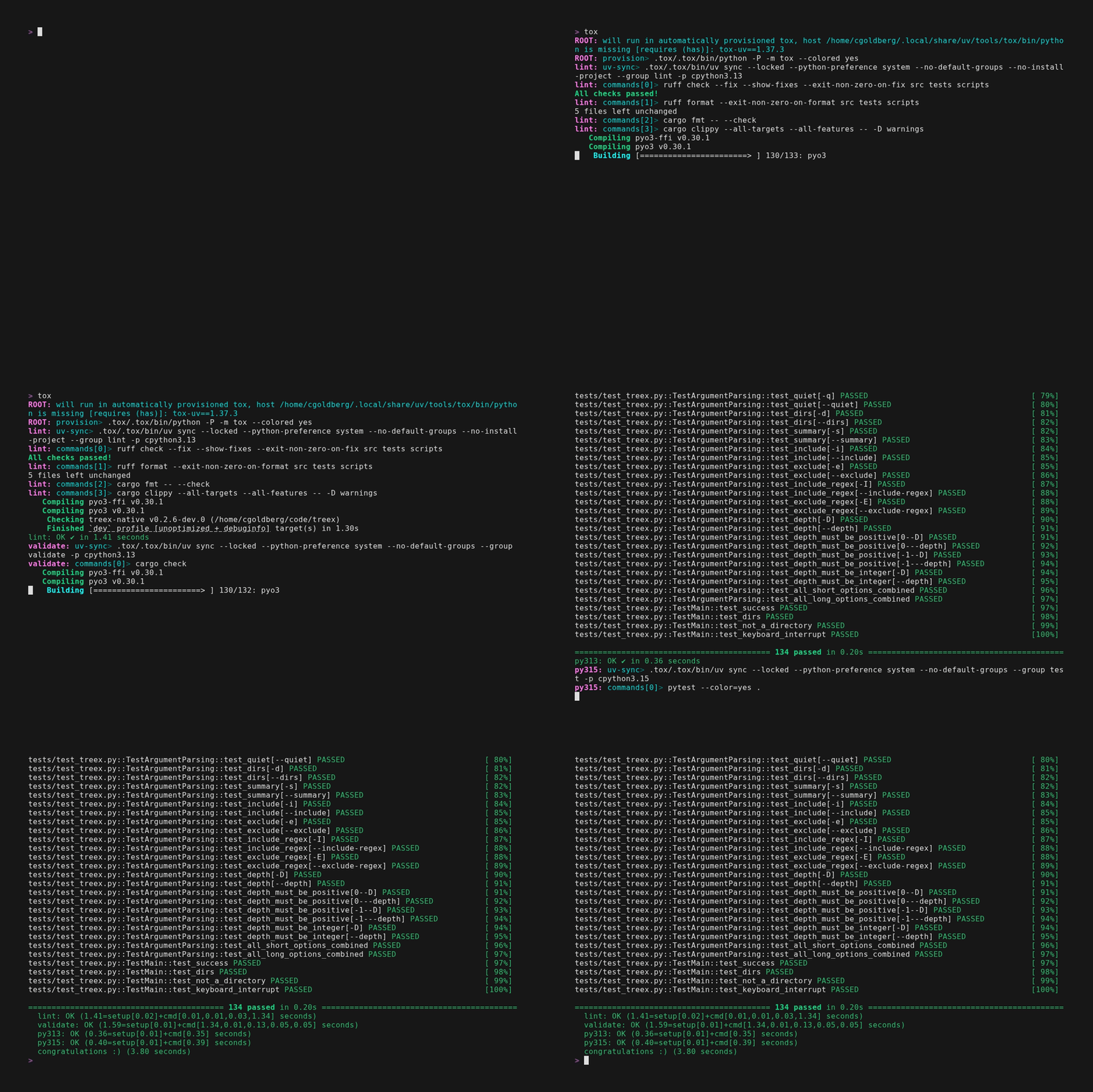
Running tox without specifying an environment executes all environments in this list. On a warm system, with environments already provisioned and the Rust extension compiled and cached, the entire suite (Python and Rust linting and validation, plus 100+ tests across two Python versions) takes only a few seconds.
CI/CD
I use GitHub Actions with test/build/release workflows that run the same tox environments used in local development.
Test workflow
On every push to main and every Pull Request targeting main, the test workflow runs a comprehensive pytest suite against Python 3.13 and 3.15 on Linux x86_64 and Windows x86_64.
Build and release workflows
Whenever I push a Git tag for a stable release, it triggers the build and release workflows. The build workflow produces an sdist and platform-specific wheel variants for all supported platforms. If all builds and checks pass, the release workflow publishes the distributions to PyPI using Trusted Publishing.
The build workflow runs on Linux x86_64, Linux ARM64, macOS ARM64, and Windows x86_64:
1
2
3
4
5
6
7
8
9
10
11
strategy:
  matrix:
    include:
      - name: linux-x86_64
        os: ubuntu-26.04
      - name: linux-aarch64
        os: ubuntu-26.04-arm
      - name: macos-arm64
        os: macos-15
      - name: windows-x86_64
        os: windows-latest
Conclusion
Integrating Gitoxide made treex faster and removed its dependency on an external Git installation. The project also gave me an opportunity to learn about Rust extensions for Python and put together a modern development workflow covering packaging, testing, cross-platform builds, and automated PyPI releases.