CLI and Python API For Running Talend Cloud Jobs (talend-task)
Python package for Talend Cloud job execution and monitoring
I am using the Talend Cloud platform (now part of Qlik) for ETL pipelines and data workflows. I needed a way to remotely execute and monitor jobs from the command line, so I wrote talend-task (MIT licensed).
talend-task Python package:
- Releases: PyPI
- Development: GitHub Repo
About talend-task
The talend-task package provides a command-line interface and Python API client for executing and monitoring jobs in Talend Cloud, including ETL pipelines and other data workflows. It uses the Processing API to trigger executions and monitor their status.
The package consists of:
talend_task: command-line interface (CLI)talend_task.talend_client: Python API client module providing theTalendClientandCredentialclasses
In this package, a “job” refers to a runnable Talend Task. Running a job creates a corresponding Talend Execution.
Installation
Install the package from PyPI:
1
pip install talend-task
CLI
talend_task is a CLI for running and monitoring jobs in Talend Cloud.
After installation, the talend_task command is available in your shell.
Select a job interactively or pass --job directly.
1
2
3
4
5
6
7
8
9
10
11
12
13
14
$ talend_task --help
usage: talend_task [-h] [--debug] [--wait] [--activity] [--job NAME] [--timeout SECS]
                   [--poll-interval SECS]

Talend Cloud CLI

options:
  -h, --help            show this help message and exit
  --debug               enable debug logging
  --wait                wait for job to complete and return status
  --activity            show recent runs without executing job (cannot use --wait)
  --job NAME            job name
  --timeout SECS        timeout (requires --wait, default: none)
  --poll-interval SECS  polling interval (requires --wait, default: 5)
CLI Configuration
The CLI requires authentication credentials and the URL of the Talend Cloud API endpoint for your region. These are configured using environment variables.
Talend Cloud supports two authentication methods, depending on the account identity:
- Personal Access Token (User Account)
- OAuth 2.0 Client Credentials (Service Account)
See the CLI Configuration section of the documentation for more information.
Example CLI Usage
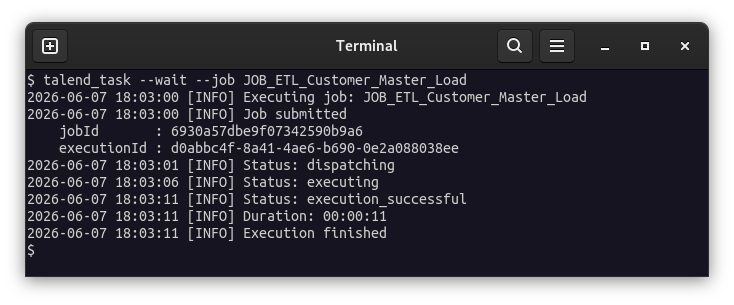
Direct Mode:
Run a job by providing --job <name>:
1
talend_task --wait --job Job1
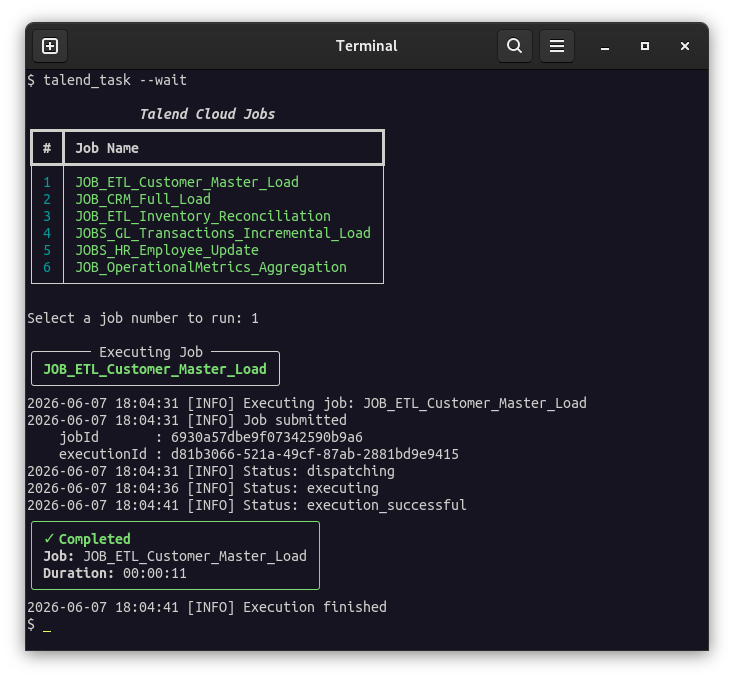
Interactive Mode:
Run the CLI without specifying a job to select and execute one from a menu:
1
talend_task --wait
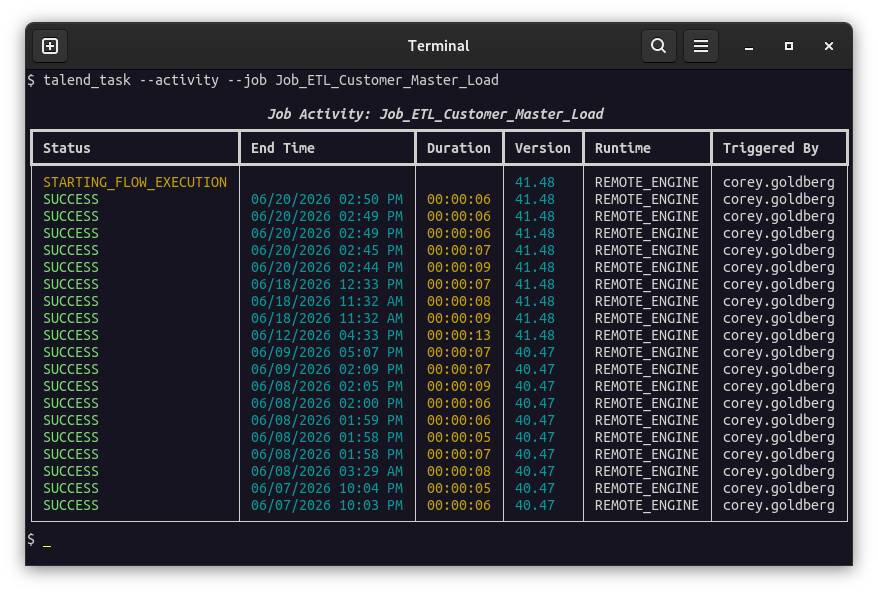
Activity Mode:
Show recent runs for a job without executing it:
1
talend_task --activity --job Job1
CLI Screenshots
Interactive Mode:
Direct Mode:
Activity Mode:
Python API Client
Use the TalendClient and Credential classes to authenticate and interact with the Talend Cloud Processing API from Python.
See the module API documentation for more information.
Example Client Usage
Run a job using a Personal Aceess Token for authentication:
1
2
3
4
5
6
7
8
9
10
from talend_task import StaticTokenCredential, TalendClient

api_url = "https://api.us.cloud.talend.com"
access_token = "token123"

credential = StaticTokenCredential(access_token)

with TalendClient(api_url, credential) as client:
    job_id = client.get_job_id("Job_123")
    status = client.run(job_id, wait=True)
Run a job using OAuth 2.0 Client Credentials flow for authentication:
1
2
3
4
5
6
7
8
9
10
11
from talend_task import OAuthClientCredential, TalendClient

api_url = "https://api.us.cloud.talend.com"
client_id = "id123"
client_secret = "secret123"

credential = OAuthClientCredential(client_id, client_secret)

with TalendClient(api_url, credential) as client:
    job_id = client.get_job_id("Job_123")
    status = client.run(job_id, wait=True)